
概要
店舗詳細ページ(/shop/[id])にメニュー一覧とスタッフ一覧を追加します。
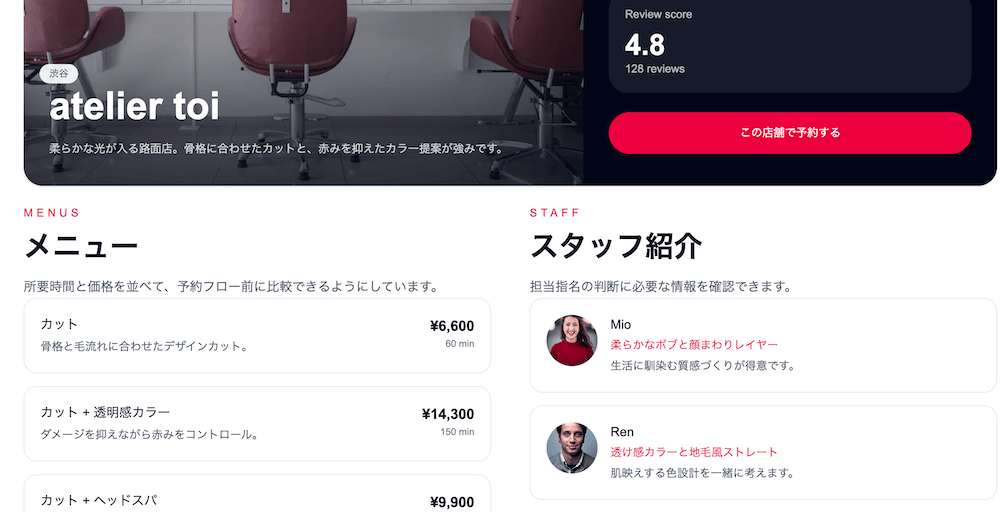
ファイル一覧
| パス | 役割 | 新規 / 編集 |
|---|---|---|
types/menu.ts | Menu 型 | 新規 |
data/MockData.ts | メニューのモックデータ | 編集 |
app/api/shops/[id]/menus/route.ts | メニュー取得 API | 新規 |
lib/services/shops.ts | getMenus | 編集 |
components/shop/ShopMenuList.tsx | メニュー表示 | 新規 |
app/shop/[id]/page.tsx | メニュー組み込み | 編集 |
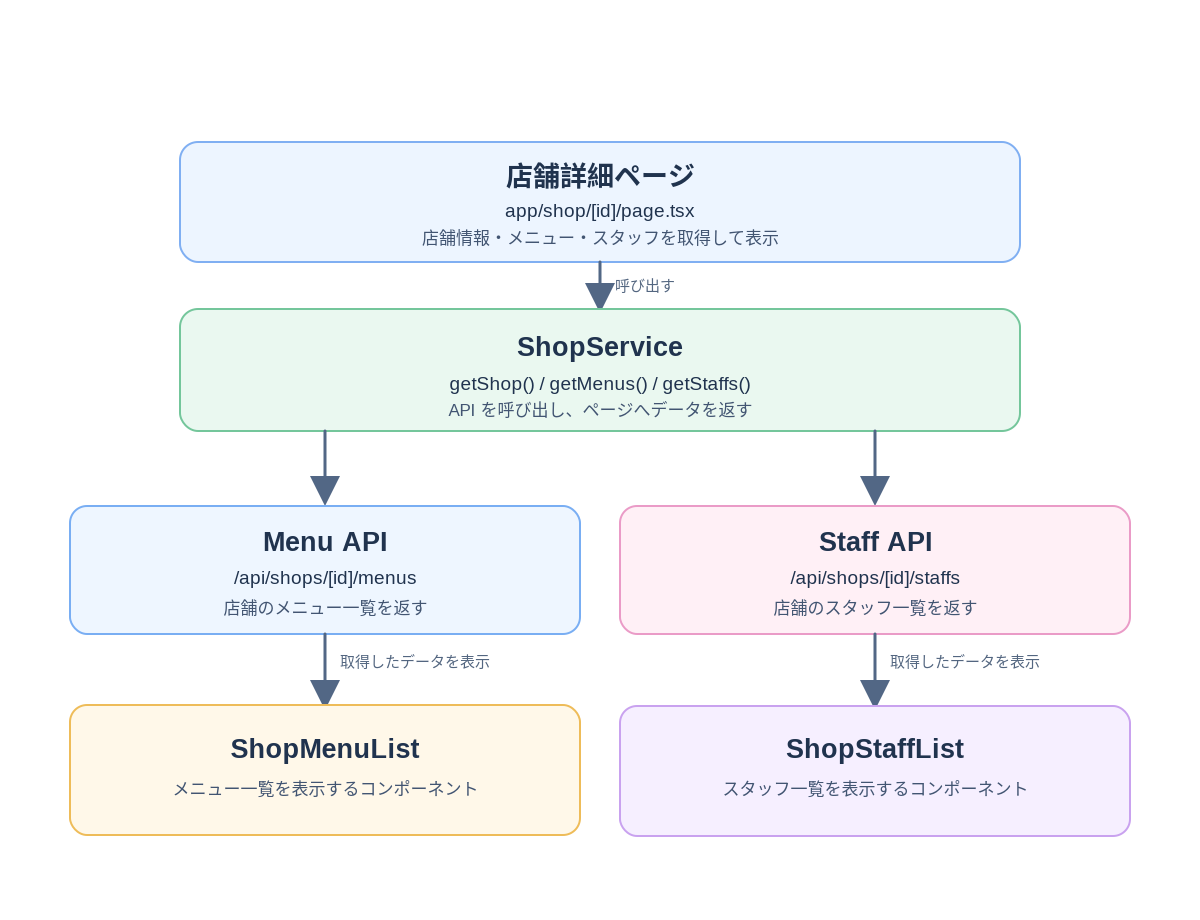
メニューAPI
Menu 型の定義
types/menu.ts を作成します。
export type Menu = {
  id: string
  name: string
  description: string
  price: number
  durationMinutes: number
}
| プロパティ | 型 | 内容 |
|---|---|---|
| id | string | メニューID |
| name | string | メニュー名 |
| description | string | 説明 |
| price | number | 価格 |
| durationMinutes | number | 所要時間(分) |
モックデータの追加
data/MockData.ts に追加します。既存の import がある場合は重複させず統合してください。
import type { Menu } from "@/types/menu"

export const MOCK_SHOP_MENUS: Record<string, Menu[]> = {
  "1": [
    {
      id: "11",
      name: "カット",
      description: "骨格と毛流れに合わせたデザインカット。",
      price: 6600,
      durationMinutes: 60,
    },
  ],
}
Record<string, Menu[]> は店舗IDをキーとしてメニュー配列を管理する型です。
const menus = MOCK_SHOP_MENUS["1"]
Route Handler の作成
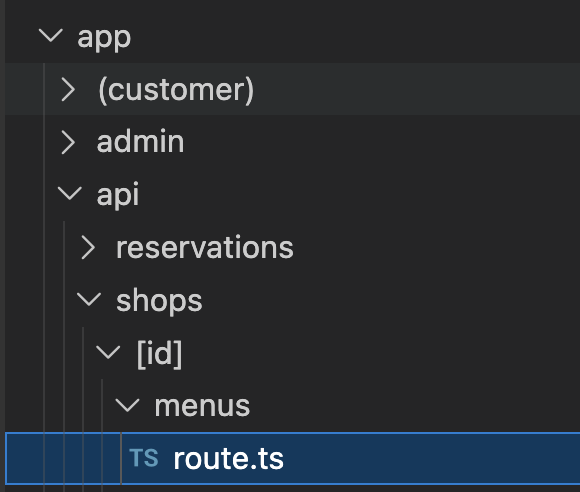
app/api/shops/[id]/menus/route.ts を作成します。
import { NextResponse } from "next/server"
import { MOCK_SHOP_MENUS } from "@/data/MockData"

type Params = {
  params: Promise<{ id: string }>
}

export async function GET(_request: Request, { params }: Params) {
  const { id } = await params
  const menus = MOCK_SHOP_MENUS[id] ?? []
  return NextResponse.json({ menus })
}
API 確認
http://localhost:3000/api/shops/1/menus にアクセスして JSON を確認します。
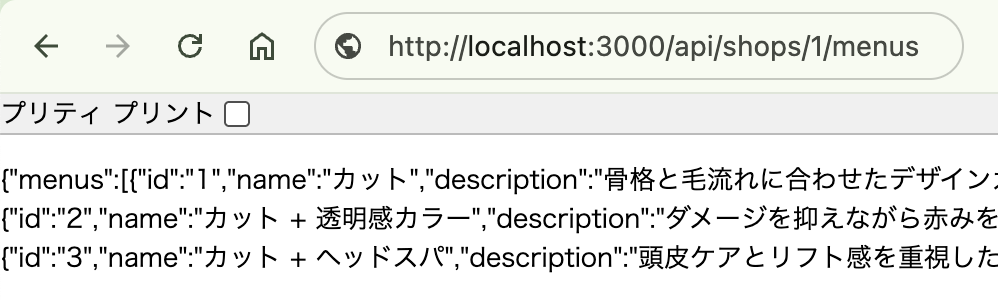
メニュー取得
ShopService に getMenus を追加
lib/services/shops.ts に追加します。BASE_URL は既存の定義を利用します。
ページ側は API の URL や fetch() の処理を直接記述せず、getMenus() を呼び出せます。
import type { Menu } from "@/types/menu"

export async function getMenus(shopId: string): Promise<Menu[]> {
  const res = await fetch(`${BASE_URL}/api/shops/${shopId}/menus`, {
    cache: "no-store",
  })
  if (!res.ok) throw new Error("メニューの取得に失敗しました")
  const data: { menus: Menu[] } = await res.json()
  return data.menus
}
ShopMenuList コンポーネント
components/shop/ShopMenuList.tsx を作成します。
import SectionHeading from "@/components/SectionHeading"
import type { Menu } from "@/types/menu"

export default function ShopMenuList({ menus }: { menus: Menu[] }) {
  if (menus.length === 0) {
    return <p className="text-sm text-slate-500">メニューは準備中です。</p>
  }

  return (
    <div>
      <SectionHeading
        eyebrow="Menus"
        title="メニュー"
        description="メニューの価格と所要時間を確認できます。"
      />
      <div className="flex flex-col gap-4">
        {menus.map((menu) => (
          <div
            key={menu.id}
            className="flex items-start justify-between gap-6 rounded-2xl border border-slate-200 p-5"
          >
            <div>
              <p className="font-medium text-slate-950">{menu.name}</p>
              <p className="mt-1 text-sm leading-6 text-slate-600">{menu.description}</p>
            </div>
            <div className="shrink-0 text-right">
              <p className="text-lg font-semibold text-slate-950">
                ¥{menu.price.toLocaleString("ja-JP")}
              </p>
              <p className="text-xs text-slate-500">{menu.durationMinutes} min</p>
            </div>
          </div>
        ))}
      </div>
    </div>
  )
}
店舗詳細ページに組み込む
この段階ではメニューだけを表示します。app/shop/[id]/page.tsx を編集します。
import { notFound } from "next/navigation"
import { getShop, getMenus } from "@/lib/services/shops"
import ShopHero from "@/components/shop/ShopHero"
import ShopMenuList from "@/components/shop/ShopMenuList"

type Props = { params: Promise<{ id: string }> }

export default async function ShopDetailPage({ params }: Props) {
  const { id } = await params
  const shop = await getShop(id)
  if (!shop) notFound()

  const menus = await getMenus(id)

  return (
    <div>
      <ShopHero shop={shop} />
      <section className="mt-12">
        <ShopMenuList menus={menus} />
      </section>
    </div>
  )
}
動作確認: /shop/1 にメニュー一覧が表示されることを確認します。
スタッフ API
メニューと同じ「型 → データ → API → Service → コンポーネント」の順番で作成します。
ファイル一覧
| パス | 役割 | 新規 / 編集 |
|---|---|---|
types/staff.ts | Staff 型 | 新規 |
data/MockData.ts | スタッフのモックデータ | 編集 |
app/api/shops/[id]/staffs/route.ts | スタッフ取得 API | 新規 |
lib/services/shops.ts | getStaffs | 編集 |
components/shop/ShopStaffList.tsx | スタッフ表示 | 新規 |
Staff 型の定義
types/staff.ts を作成します。
export type Staff = {
  id: string
  name: string
  specialty: string
  bio: string
  imageUrl: string
}
| プロパティ | 型 | 内容 |
|---|---|---|
| id | string | スタッフID |
| name | string | 名前 |
| specialty | string | 得意分野 |
| bio | string | 自己紹介 |
| imageUrl | string | 画像URL |
モックデータの追加
data/MockData.ts に追加します。
import type { Staff } from "@/types/staff"

export const MOCK_SHOP_STAFF: Record<string, Staff[]> = {
  "1": [
    {
      id: "101",
      name: "Mio",
      specialty: "柔らかなボブと顔まわりレイヤー",
      bio: "生活に馴染む質感づくりが得意です。",
      imageUrl: "/images/staff-mio.avif",
    },
  ],
}
Route Handler の作成
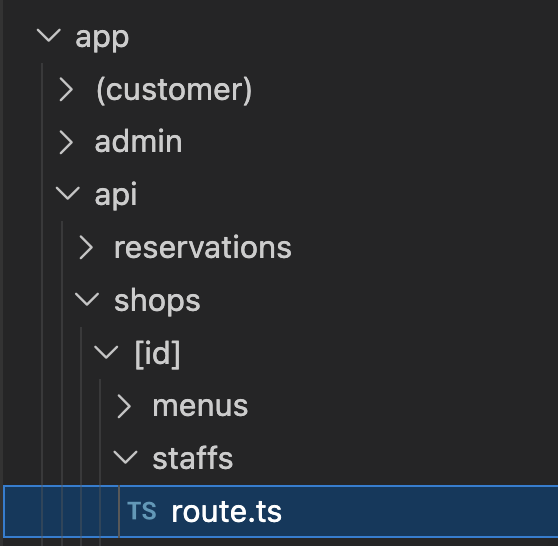
app/api/shops/[id]/staffs/route.ts を作成します。
import { NextResponse } from "next/server"
import { MOCK_SHOP_STAFF } from "@/data/MockData"

type Params = { params: Promise<{ id: string }> }

export async function GET(_request: Request, { params }: Params) {
  const { id } = await params
  const staffs = MOCK_SHOP_STAFF[id] ?? []
  return NextResponse.json({ staffs })
}
http://localhost:3000/api/shops/1/staffs で JSON を確認します。
スタッフ一覧
ShopService に getStaffs を追加
lib/services/shops.ts に追加します。
import type { Staff } from "@/types/staff"

export async function getStaffs(shopId: string): Promise<Staff[]> {
  const res = await fetch(`${BASE_URL}/api/shops/${shopId}/staffs`, {
    cache: "no-store",
  })
  if (!res.ok) throw new Error("スタッフの取得に失敗しました")
  const data: { staffs: Staff[] } = await res.json()
  return data.staffs
}
ShopStaffList コンポーネント
components/shop/ShopStaffList.tsx を作成します。
import Image from "next/image"
import type { Staff } from "@/types/staff"
import SectionHeading from "@/components/SectionHeading"

export default function ShopStaffList({ staffs }: { staffs: Staff[] }) {
  if (staffs.length === 0) {
    return <p className="text-sm text-slate-500">スタッフ情報は準備中です。</p>
  }

  return (
    <div>
      <SectionHeading
        eyebrow="Staff"
        title="スタッフ紹介"
        description="スタッフの得意分野を確認できます。"
      />
      <div className="flex flex-col gap-4">
        {staffs.map((staff) => (
          <div
            key={staff.id}
            className="flex items-start gap-4 rounded-2xl border border-slate-200 p-5"
          >
            <div className="relative h-16 w-16 shrink-0 overflow-hidden rounded-full">
              <Image
                src={staff.imageUrl}
                alt={staff.name}
                fill
                sizes="64px"
                className="object-cover"
              />
            </div>
            <div>
              <p className="font-medium text-slate-950">{staff.name}</p>
              <p className="mt-1 text-sm text-rose-600">{staff.specialty}</p>
              <p className="mt-1 text-sm leading-6 text-slate-600">{staff.bio}</p>
            </div>
          </div>
        ))}
      </div>
    </div>
  )
}
店舗詳細ページ組み込む
最後に app/shop/[id]/page.tsx を編集します。
import { notFound } from "next/navigation"
import { getShop, getMenus, getStaffs } from "@/lib/services/shops"
import ShopHero from "@/components/shop/ShopHero"
import ShopMenuList from "@/components/shop/ShopMenuList"
import ShopStaffList from "@/components/shop/ShopStaffList"

type Props = { params: Promise<{ id: string }> }

export default async function ShopDetailPage({ params }: Props) {
  const { id } = await params
  const shop = await getShop(id)
  if (!shop) notFound()

  // 互いに依存しないデータを並列取得
  const [menus, staffs] = await Promise.all([
    getMenus(id),
    getStaffs(id),
  ])

  return (
    <div>
      <ShopHero shop={shop} />
      <section className="mt-12 grid gap-12 lg:grid-cols-2">
        <ShopMenuList menus={menus} />
        <ShopStaffList staffs={staffs} />
      </section>
    </div>
  )
}
Promise.all で並列取得する理由
getMenus(id) と getStaffs(id) は互いの結果に依存しないため、並列に実行できます。
| 書き方 | 待ち時間の目安 |
|---|---|
await を順番に実行 | 2つの通信時間の合計 |
Promise.all | 遅い方の通信時間程度 |
実際の時間は通信・サーバー処理によって変わります。どちらか一方が失敗すると Promise.all() 全体が失敗します。shop は存在確認して notFound() を呼ぶため、先に取得しています。
動作確認
/shop/1 でヒーロー、メニュー、スタッフが表示されることを確認します。
---
まとめ
| 項目 | 内容 |
|---|---|
| 型定義 | Menu と Staff を別々に定義 |
| モックデータ | 店舗IDをキーに配列を管理 |
| Route Handler | [id] を使って店舗別データを返す |
| Service | API 取得処理をページから分離 |
| コンポーネント | メニューとスタッフを独立して表示 |
Promise.all | 独立した非同期処理を並列実行 |
?? [] | データがないときに空配列を返す |
lg:grid-cols-2 | 大きい画面で2列に表示 |
コース内レッスン
- 1
Lesson 1
はじめに
レッスンを見る - 2
Lesson 2
プロジェクト作成
レッスンを見る - 3
Lesson 3
コンポーネントとレイアウト
レッスンを見る - 4
Lesson 4
App Router
レッスンを見る - 5
Lesson 5
型定義とモックデータ
レッスンを見る - 6
Lesson 6
Route Handler
レッスンを見る - 7
Lesson 7
Dynamic Routes
レッスンを見る - 8
Lesson 8
店舗詳細ページ
レッスンを見る - 9
Lesson 9
Client Component と状態管理
レッスンを見る - 10
Lesson 10
予約フォーム
レッスンを見る - 11
Lesson 11
Firebaseセットアップ
レッスンを見る - 12
Lesson 12
ユーザ認証
レッスンを見る - 13
Lesson 13
Firebase認証
レッスンを見る - 14
Lesson 14
認証・認可
レッスンを見る - 15
Lesson 15
予約処理
レッスンを見る - 16
Lesson 16
ハイドレーション
レッスンを見る