
Dynamic Routes とは
Next.js の App Router では、フォルダ名を [パラメータ名] (Slug)にすると、その部分が可変の URL セグメントになります。この手法を Dynamic Routes (動的ルーティング)といいます。
API
| パス | 内容 |
|---|---|
/shop | 店舗一覧 |
/shop/[id] | 店舗詳細(例: /shop/1) |
ShopCard からのリンク
ShopCard コンポーネントからは、すでに /shop/${shop.id} のリンクがされており、店舗詳細ページではパラメータの id を取得して処理します。
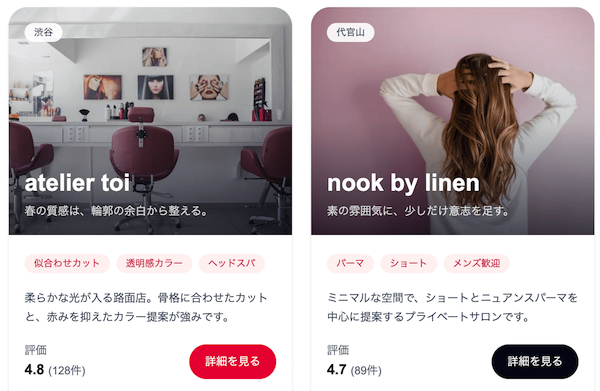
<Link href={`/shop/${shop.id}`}>詳細を見る</Link>
リンク例
/shop/1
/shop/2
...
店舗詳細 API
Route Handler
API 側にも Dynamic Routes と同じ仕組みが使えます。app/api/shops/[id]/route.ts を新規作成します。
import { NextResponse } from "next/server"
import { MOCK_SHOPS } from "@/data/MockData"

type Params = { params: Promise<{ id: string }> }

export async function GET(_request: Request, { params }: Params) {
  const { id } = await params
  const shop = MOCK_SHOPS.find((s) => s.id === id)

  if (!shop) {
    return NextResponse.json({ error: "not found" }, { status: 404 })
  }

  return NextResponse.json({ shop })
}
Route Handlerの中でもparamsはPromiseとして渡され、page.tsxと同じようにawaitして取り出します。
ShopService
ShopService(lib/services/shops.ts)から API を呼び出す getShop(id) を追加します。
export async function getShop(id: string): Promise<Shop | null> {
  const res = await fetch(`${BASE_URL}/api/shops/${id}`, { cache: "no-store" })
  if (res.status === 404) return null

  const data: { shop: Shop } = await res.json()
  return data.shop
}
| 分岐 | 意味 |
|---|---|
| res.status === 404 | Route Handler が「見つからない」と返してきた場合、null を返す |
店舗詳細ページ
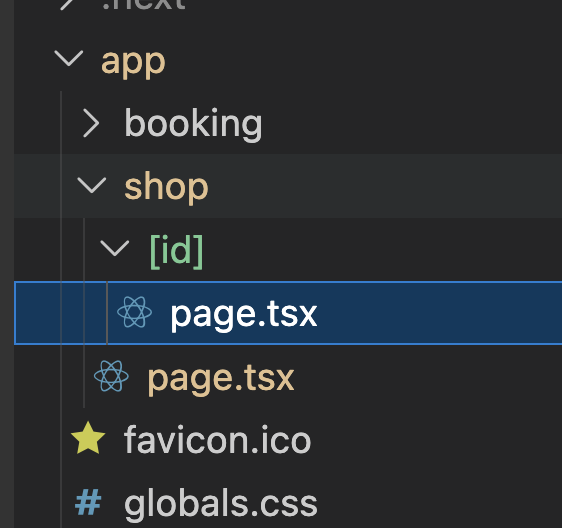
app/shop/[id]/page.tsx を新規作成します。
Dynamic Routes ではフォルダ名を [id] や [slug] とするのがポイントです。
params 定義
動的ルートの params は Promise として渡されします。店舗詳細ページでは店舗ID id を string型 のProps で定義します。
// Props のデータ型
type Props = {
  params: Promise<{ id: string }>
}

// コンポーネントの params
export default async function ShopDetailPage({ params }: Props) {

}
id 取得(非同期)
Server Component では非同期 await で id を取り出し、ShopService の getShop(id) に渡します。
import { getShop } from "@/lib/services/shops"

export default async function ShopDetailPage({ params }: Props) {
  // 非同期で id を取得
  const { id } = await params
  // ShopService 経由で1件取得
  const shop = await getShop(id)

  return (
    <div>
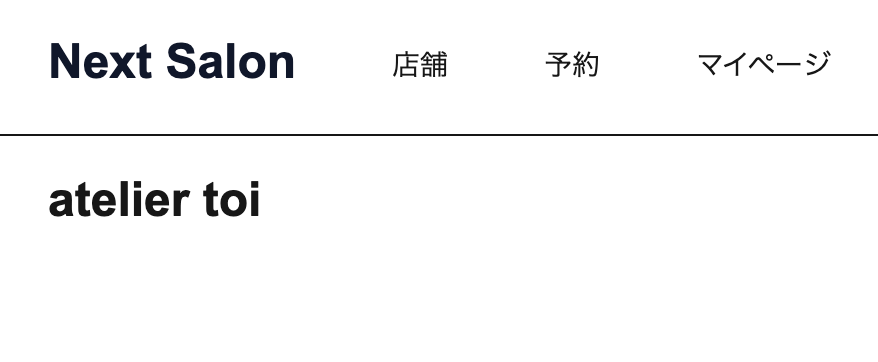
      <h1 className="text-2xl font-bold">{shop?.name}</h1>
    </div>
  )
}
6章で作った
ShopServiceをここでも再利用します。ページ側はRoute Handlerやfetchの詳細を意識せず、getShop(id)を呼ぶだけで済みます。
?.(オプショナルチェーン)
?. は オプショナルチェーン(Optional Chaining) と呼ばれるJavaScript / TypeScript の書き方です。
<h1 className="text-2xl font-bold">{shop?.name}</h1>
- shop にデータがあれば name を取得する。
- shop が null や undefined ならエラーにせず undefined にする
404 処理
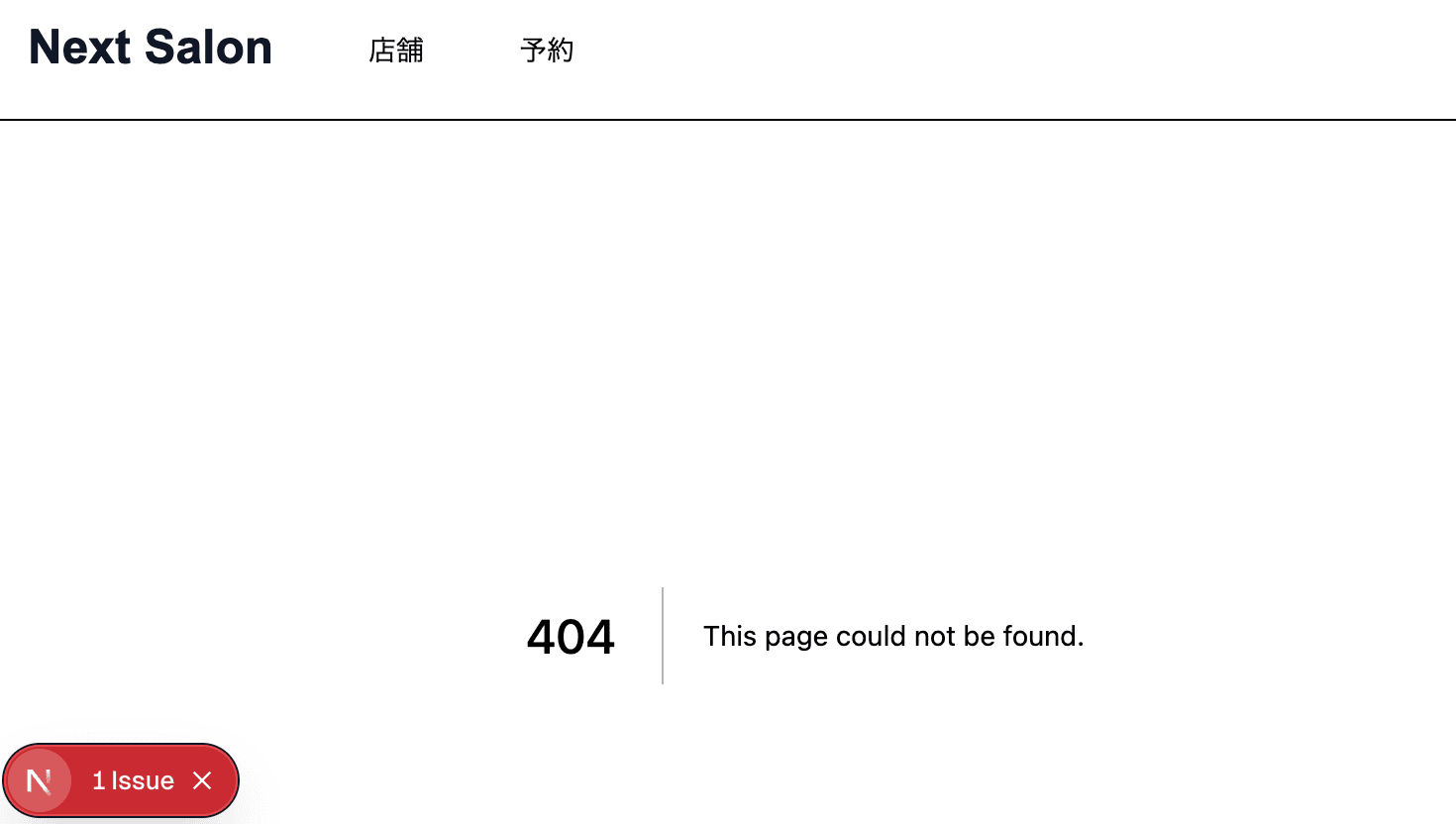
存在しない id がアクセスされた場合(例: /shop/999)、notFound() を使って安全に 404 ページを返します。
import { notFound } from "next/navigation"
import { getShop } from "@/lib/services/shops"

type Props = {
    params: Promise<{ id: string }>
}

export default async function ShopDetailPage({ params }: Props) {
    const { id } = await params
    const shop = await getShop(id)

    // Notfound 404
    if (!shop) {
        notFound()
    }

    return (
        <div>
            <h1 className="text-2xl font-bold">{shop.name}</h1>
        </div>
    )
}

notFound()を呼ぶと、その場で処理が中断されapp/not-found.tsx(未作成の場合は Next.js 標準の 404 UI)が表示されます。
ShopHero コンポーネント
ヒーロー部分は JSX が長くなるため、page.tsx に直接書かず、専用コンポーネントに分けます。

コンポーネント作成
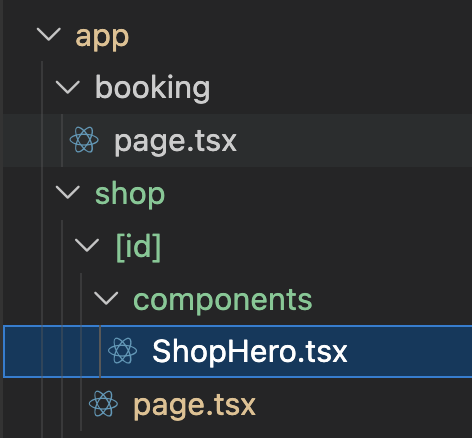
components/shop/ShopHero.tsx を作成します。
グリッドレイアウト
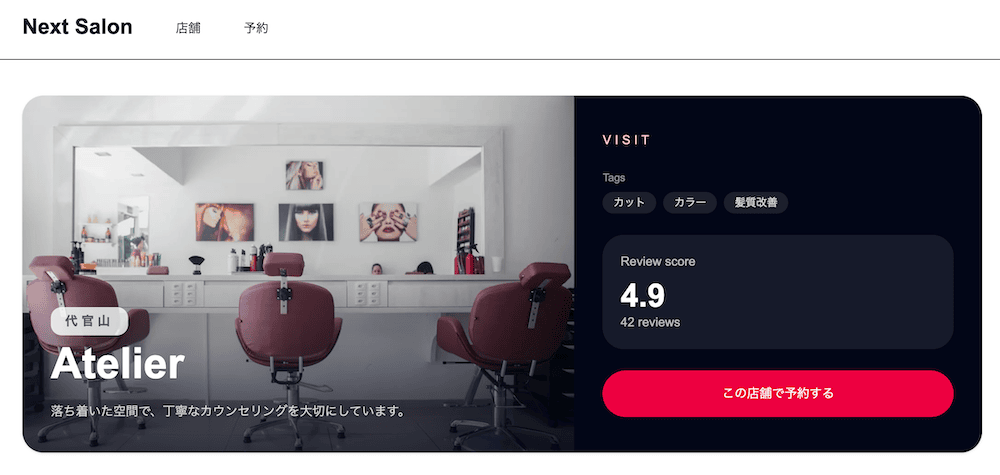
ヒーローエリアは「画像 + 情報パネル」の 2 カラム構成にします。
<div className="grid lg:grid-cols-[1.15fr_0.85fr]">
  <div>{/* 画像エリア */}</div>
  <div>{/* 情報パネル */}</div>
</div>
grid-cols
Tailwind の grid-cols-[...] には任意の比率を指定できます。
fr はfr は fraction(割合・分数) の略で、利用できるスペースを何分ずつ使うかを表す単位です。
1.15fr + 0.85fr = 2fr でグリッドレイアウトした場合です。
lg:grid-cols-[1.15fr_0.85fr]
| 項目 | 指定 | 割合 |
|---|---|---|
| 左 | 1.15fr | 57.5% |
| 右 | 0.85fr | 42.5% |
店舗詳細
左側には店舗名や画像を表示、右カラムには、店舗詳細や予約リンク(/shop/[id]/book)などを配置します。
import Image from "next/image"
import Link from "next/link"

import type { Shop } from "@/types/shop"

export default function ShopHero({ shop }: { shop: Shop }) {
  return (
    <section className="overflow-hidden rounded-3xl bg-white shadow-sm">
      <div className="grid lg:grid-cols-[1.15fr_0.85fr]">
        <div className="relative min-h-96">
          <Image
            src={shop.coverImage}
            alt={shop.name}
            fill
            priority
            className="object-cover"
            sizes="(max-width: 1024px) 100vw, 60vw"
          />
          <div className="absolute inset-0 bg-linear-to-t from-slate-950/75 via-slate-950/10 to-transparent" />
          <div className="absolute inset-x-0 bottom-0 p-8 text-white">
            <div className="absolute left-5 top-5 rounded-full bg-white/90 px-3 py-1 text-xs font-medium text-slate-700">
              {shop.area}
            </div>
            <h1 className="mt-4 text-4xl font-semibold sm:text-5xl">
              {shop.name}
            </h1>
            <p className="mt-4 max-w-2xl text-sm leading-7 text-white/80">
              {shop.description}
            </p>
          </div>
        </div>

        <div className="bg-slate-950 px-8 py-10 text-white">
          <p className="text-sm font-medium tracking-[0.3em] text-rose-200 uppercase">
            Visit
          </p>
          <div className="mt-6 space-y-6">
            <div>
              <p className="text-xs text-white/55">Tags</p>
              <div className="mt-2 flex flex-wrap gap-2">
                {shop.tags.map((tag) => (
                  <span
                    key={tag}
                    className="rounded-full bg-white/10 px-3 py-1 text-xs font-medium text-white/85"
                  >
                    {tag}
                  </span>
                ))}
              </div>
            </div>
            <div className="rounded-3xl bg-white/8 p-5">
              <p className="text-sm text-white/70">Review score</p>
              <p className="mt-2 text-4xl font-semibold">{shop.rating}</p>
              <p className="text-sm text-white/70">
                {shop.reviewCount} reviews
              </p>
            </div>
            <Link
              href={`/shop/${shop.id}/book`}
              className="inline-flex w-full items-center justify-center rounded-full bg-rose-600 px-5 py-4 text-sm font-medium text-white transition hover:bg-rose-500"
            >
              この店舗で予約する
            </Link>
          </div>
        </div>
      </div>
    </section>
  )
}
ポイント:
ShopHeroはクリックイベントや state を使わないため、"use client"は不要です。Server Component のままnext/imageやnext/linkを使えます。
最後に app/shop/[id]/page.tsx から ShopHero を呼び出します。
import { notFound } from "next/navigation"

import { getShop } from "@/lib/services/shops"
import ShopHero from "@/components/shop/ShopHero"

type Props = {
  params: Promise<{ id: string }>
}

export default async function ShopDetailPage({ params }: Props) {
  const { id } = await params

  const shop = await getShop(id)
  if (!shop) {
    notFound()
  }

  return (
    <div>
      <ShopHero shop={shop} />
    </div>
  )
}
動作確認
/shop/1などの正しい ID → 店舗詳細(ヒーロー部分)が表示される
/shop/999などの存在しない ID → 404 ページが表示される
まとめ
| テーマ | ポイント |
|---|---|
| 動的ルーティング | [id] フォルダで可変 URL セグメントを表現 |
params | Next.js 15 では Promise として渡される。await して取り出す |
notFound() | 該当データがない場合に 404 を返す。以降 TypeScript の型も絞り込まれる |
generateMetadata | ページごとに動的にタイトル・説明文を生成できる |
| Route Handler の動的セグメント | page.tsx と同じ [id] の仕組みが app/api/ 配下でも使える |
| ShopService の再利用 | 一覧・詳細どちらも getShop / getShops を呼ぶだけで、Route Handler の詳細をページ側が意識しない |
grid-cols-[...] | Tailwind で任意の比率の 2 カラムレイアウトを組める |
| コンポーネントの Props 化 | SectionHeading にデフォルト引数付き Props を持たせ、複数ページで再利用できるようにする |
コース内レッスン
- 1
Lesson 1
はじめに
レッスンを見る - 2
Lesson 2
プロジェクト作成
レッスンを見る - 3
Lesson 3
コンポーネントとレイアウト
レッスンを見る - 4
Lesson 4
App Router
レッスンを見る - 5
Lesson 5
型定義とモックデータ
レッスンを見る - 6
Lesson 6
Route Handler
レッスンを見る - 7
Lesson 7
Dynamic Routes
レッスンを見る - 8
Lesson 8
店舗詳細ページ
レッスンを見る - 9
Lesson 9
Client Component と状態管理
レッスンを見る - 10
Lesson 10
予約フォーム
レッスンを見る - 11
Lesson 11
Firebaseセットアップ
レッスンを見る - 12
Lesson 12
ユーザ認証
レッスンを見る - 13
Lesson 13
Firebase認証
レッスンを見る - 14
Lesson 14
認証・認可
レッスンを見る - 15
Lesson 15
予約処理
レッスンを見る - 16
Lesson 16
ハイドレーション
レッスンを見る