
概要
予約内容を選ぶ画面はできあがりましたが、「この内容で予約する」ボタンはまだ何もしません。
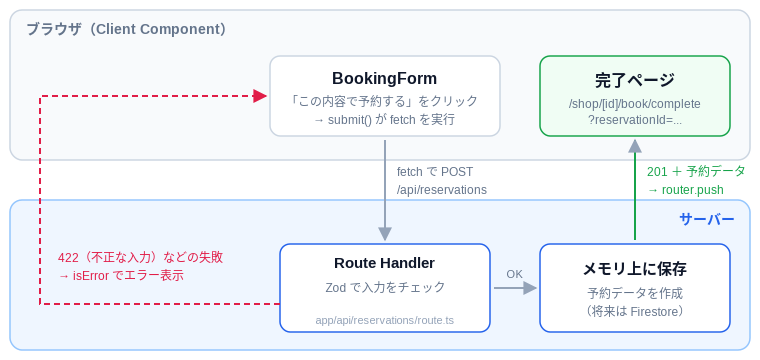
ここでは、予約データをサーバーに送信して保存し、成功したら 完了ページへ遷移する ところまでを作ります。
| これまで | これから |
|---|---|
| 「この内容で予約する」を押しても何も起きない | 予約 API に送信し、完了ページ(/shop/[id]/book/complete)へ遷移する |
| 選んだ内容は画面の state にあるだけ | Zod でチェックしたうえで、サーバーに保存する |
この段階では、ログイン(認証)は扱いません。誰でも予約を送信できる API です。認証は、予約の流れができあがったあとに追加します。
全体の流れ
ファイル一覧
| パス | 役割 | 新規 / 編集 |
|---|---|---|
| types/reservation.ts | Reservation 型の定義 | 新規 |
| lib/validations/reservation.ts | 予約作成の Zod スキーマ | 新規 |
| app/api/reservations/route.ts | 予約作成の Route Handler | 新規 |
| contexts/BookingContext.tsx | toReservationInput を追加 | 編集 |
| hooks/useSubmitReservation.ts | 予約を送信して完了ページへ遷移するフック | 新規 |
| components/booking/BookingNavigation.tsx | 送信中の表示と「予約する」の処理を追加 | 編集 |
| components/booking/BookingForm.tsx | フックを呼び出し、エラー表示を組み込む | 編集 |
| app/shop/[id]/book/complete/page.tsx | 予約完了ページ | 新規 |
型定義
types/reservation.ts を作成します。
export type Reservation = {
  id: string
  shopId: string
  menuId: string
  staffId: string | null
  date: string
  time: string
  notes: string
  status: "pending"
  createdAt: string
}
| プロパティ | 型 | 内容 |
|---|---|---|
| id | string | 予約 ID(サーバー側で決める) |
| shopId | string | 店舗 ID |
| menuId | string | メニュー ID |
| staffId | string | null | スタッフ ID(null は指名なし) |
| date | string | 予約日(YYYY-MM-DD) |
| time | string | 予約時間(HH:MM) |
| notes | string | 備考 |
| status | "pending" | 予約の状態。今は「受付済み」の 1 種類だけ |
| createdAt | string | 作成日時(ISO 形式) |
Zod によるバリデーション
Zod は、TypeScript 向けのバリデーション(入力値チェック)ライブラリです。「このデータはどんな形をしているべきか」というルールを スキーマ として定義し、実際のデータがルールに合っているかをチェックします。
npm install zod
| できること | 説明 |
|---|---|
| 実行時のチェック | フォームや API に届いた値が、決めたルールどおりかを確認する |
| 型の自動生成 | スキーマから TypeScript の型を自動で作れる(z.infer) |
データチェックの必要性
TypeScript の type がチェックするのは、コンパイル時 だけです。ブラウザから送られてくるデータは、実行してみるまで中身がわかりません。画面を通さず、直接 API にリクエストを送ることもできます。そのため、サーバー側では Zod で必ずチェックします。
スキーマの作成
lib/validations/reservation.ts を作成します。
import { z } from "zod"

export const reservationInputSchema = z.object({
  shopId: z.string().min(1),
  menuId: z.string().min(1),
  staffId: z.string().min(1).nullable(),
  date: z.string().regex(/^\d{4}-\d{2}-\d{2}$/),
  time: z.string().regex(/^\d{2}:\d{2}$/),
  notes: z.string().max(500),
})

export type ReservationInput = z.infer<typeof reservationInputSchema>
| フィールド | チェック内容 |
|---|---|
| shopId ・ menuId | 1 文字以上の文字列 |
| staffId | 1 文字以上の文字列、または null(指名なしを許可するため) |
| date | YYYY-MM-DD 形式 |
| time | HH:MM 形式 |
| notes | 500 文字以内(備考の textarea の maxLength と同じ) |
z.infer<typeof reservationInputSchema>は、スキーマから型を自動生成する書き方です。スキーマと型を別々に書くと、片方だけ直してズレることがあります。z.inferを使えば、スキーマだけを直せば型も変わります。
予約作成の Route Handler
app/api/reservations/route.ts を作成します。
import { NextResponse } from "next/server"
import { reservationInputSchema } from "@/lib/validations/reservation"
import type { Reservation } from "@/types/reservation"

// モック段階の一時保存用。サーバー再起動でリセットされる。
const reservations: Reservation[] = []

export async function POST(request: Request) {
  const body: unknown = await request.json().catch(() => null)
  const parsed = reservationInputSchema.safeParse(body)

  if (!parsed.success) {
    return NextResponse.json({ error: "invalid input" }, { status: 422 })
  }

  const reservation: Reservation = {
    id: String(reservations.length + 1),
    ...parsed.data,
    status: "pending",
    createdAt: new Date().toISOString(),
  }

  reservations.push(reservation)

  return NextResponse.json({ reservation }, { status: 201 })
}
| 部分 | 説明 |
|---|---|
request.json().catch(() => null) | JSON として読めない本文が届いても、エラーで止まらず null として扱う |
body: unknown | 中身がわからない値は any ではなく unknown にし、Zod で確認してから使う |
safeParse | チェック結果を { success, data } で返す。失敗しても例外を投げない |
...parsed.data | チェック済みの値だけを予約データにコピーする |
| ステータスコード | 意味 | 返す場面 |
|---|---|---|
| 201 Created | 作成できた | 予約を保存できたとき |
| 422 Unprocessable Content | 内容が不正 | JSON として読めない、または Zod のチェックに失敗したとき |
注意: 今は認証をしていないので、誰でもこの API に予約を送れます。ログイン必須にする処理は、あとから追加します。
reservations配列はサーバーのメモリ上にあるため、開発サーバーを再起動するとデータは消えます。
API の確認
ターミナルからリクエストを送り、ステータスコードを確認します。ポート番号は、開発サーバーを起動しているものに合わせてください。
Mac / Linux(curl)
# 入力が不足 → 422
curl -i -X POST http://localhost:3000/api/reservations \
  -H "Content-Type: application/json" -d '{"shopId":"1"}'

# 正しい入力 → 201
curl -i -X POST http://localhost:3000/api/reservations \
  -H "Content-Type: application/json" \
  -d '{"shopId":"1","menuId":"11","staffId":null,"date":"2026-12-01","time":"10:00","notes":""}'
Windows(PowerShell)
PowerShell の curl は Invoke-WebRequest の別名で、Mac の curl とは書き方が違います。ここでは Invoke-WebRequest を使い、StatusCode(ステータスコード)を表示します。
# 入力が不足 → 422
try {
  Invoke-WebRequest -Method Post -Uri http://localhost:3000/api/reservations `
    -ContentType "application/json" -Body '{"shopId":"1"}' -UseBasicParsing
} catch {
  $_.Exception.Response.StatusCode.value__
}

# 正しい入力 → 201
$body = @{
  shopId  = "1"
  menuId  = "11"
  staffId = $null
  date    = "2026-12-01"
  time    = "10:00"
  notes   = ""
} | ConvertTo-Json

Invoke-WebRequest -Method Post -Uri http://localhost:3000/api/reservations `
  -ContentType "application/json" -Body $body -UseBasicParsing
| 部分 | 説明 |
|---|---|
`(バッククォート) | 行末に付けると、コマンドを次の行に続けられる(Mac の \ と同じ役割) |
try { ... } catch { ... } | PowerShell は 422 のような失敗のステータスを エラー として扱うため、catch でステータスコードを取り出す |
$_.Exception.Response.StatusCode.value__ | catch の中で、返ってきたステータスコードの数字を表示する |
ConvertTo-Json | ハッシュテーブルを JSON 文字列に変換する。引用符のエスケープが要らない。$null は null になる |
-UseBasicParsing | Windows PowerShell 5.1 で、Internet Explorer に依存せずに実行するためのオプション |
リクエスト成功
201 のときは、本文に作成された予約データが返ります。
{"reservation":{"id":"1","shopId":"1","menuId":"11","staffId":null,"date":"2026-12-01","time":"10:00","notes":"","status":"pending","createdAt":"2026-10-31T08:04:45.308Z"}}
id ・ status ・ createdAt は、サーバー側で付けた値です。
BookingContext に追加
contexts/BookingContext.tsx を編集します。
toReservationInput
画面の state(BookingState)を、API に送る形(ReservationInput)に変換する関数を追加します。先頭に import を追加し、bookingReducer の下に関数を書きます。
import type { ReservationInput } from "@/lib/validations/reservation"

...

// 未選択の項目がある場合は null を返す
export function toReservationInput(shopId: string, state: BookingState): ReservationInput | null {
  if (!state.menuId || !state.date || !state.time) return null
  return {
    shopId,
    menuId: state.menuId,
    staffId: state.staffId,
    date: state.date,
    time: state.time,
    notes: state.notes,
  }
}
| 部分 | 説明 |
|---|---|
if (!state.menuId || ...) return null | 必須項目が 1 つでも未選択なら、送れる状態ではないので null を返す |
return の中の state.menuId | 上の if を通過しているので、TypeScript は string(null ではない)と判断する |
state.menuId!のように!(非 null アサーション)を付けても型エラーは消せます。しかし!は「絶対に null ではない」と TypeScript に 思い込ませる だけで、実際にnullだった場合は防げません。ifで確認してから使えば、型も実際の値も安全です。
送信処理のフック
BookingForm.tsx に送信処理を直接書くと長くなるため、hooks/useSubmitReservation.ts に切り出します。標準の fetch で /api/reservations に送信し、送信中・失敗の状態は useState で持ちます。
"use client"

import { useState } from "react"
import { useRouter } from "next/navigation"
import type { ReservationInput } from "@/lib/validations/reservation"
import type { Reservation } from "@/types/reservation"

export function useSubmitReservation(shopId: string) {
  const router = useRouter()
  const [isPending, setIsPending] = useState(false)
  const [isError, setIsError] = useState(false)

  const submit = async (input: ReservationInput) => {
    setIsPending(true)
    setIsError(false)

    try {
      const res = await fetch("/api/reservations", {
        method: "POST",
        headers: { "Content-Type": "application/json" },
        body: JSON.stringify(input),
      })
      if (!res.ok) {
        throw new Error("予約の作成に失敗しました")
      }

      const data: { reservation: Reservation } = await res.json()
      router.push(`/shop/${shopId}/book/complete?reservationId=${encodeURIComponent(data.reservation.id)}`)
    } catch {
      setIsError(true)
      setIsPending(false)
    }
  }

  return { submit, isPending, isError }
}
| 部分 | 説明 |
|---|---|
useSubmitReservation(shopId) | 送信先の店舗 ID を受け取る。完了ページの URL に使う |
useState(false) ×2 | isPending(送信中か)と isError(失敗したか)を持つ |
fetch("/api/reservations", { method: "POST", ... }) | Route Handler に JSON を送る。body は JSON.stringify で文字列にする |
res.ok | ステータスコードが 200〜299 なら true。422 などの失敗では false |
throw new Error(...) | 失敗を catch に渡す。ネットワークエラーで fetch 自体が失敗したときも、同じ catch に来る |
router.push(...) | 成功したら完了ページへ移動する。予約番号はクエリ文字列(?reservationId=...)で渡す |
encodeURIComponent | URL に入れられない文字が混ざっても壊れないよう、値を安全な形に変換する |
setIsPending(false) | 失敗したときだけ戻す。成功したときは、ページが切り替わるまで「予約中...」のままにして、二重送信を防ぐ |
return { submit, isPending, isError } | 呼び出し側が使う関数と状態を、まとめて返す |
fetchは、submitが呼ばれたとき(ボタンが押されたとき)だけ実行されます。画面が表示されたときに自動で呼ぶ処理ではないので、useEffectは使いません。
useRouterのようなフックを使うため、ファイルの先頭に"use client"を書きます。名前がuseで始まるフックは、hooks/に置きます。
BookingForm で送信
BookingNavigation
送信中は「戻る」と「この内容で予約する」を押せないようにし、ボタンの表示も「予約中...」に変えます。components/booking/BookingNavigation.tsx に、isPending と onSubmit を追加します。
type BookingNavigationProps = {
  step: number
  canGoNext: boolean
  isPending: boolean
  onPrev: () => void
  onNext: () => void
  onSubmit: () => void
}

export default function BookingNavigation({ step, canGoNext, isPending, onPrev, onNext, onSubmit }: BookingNavigationProps) {
  return (
    <div className="my-4 flex justify-center gap-3">
      <button type="button" onClick={onPrev} disabled={step === 1 || isPending} className={ui.button}>
        戻る
      </button>
      {step < TOTAL_STEPS ? (
        ...
      ) : (
        <button type="button" onClick={onSubmit} disabled={isPending} className={ui.primaryButton}>
          {isPending ? "予約中..." : "この内容で予約する"}
        </button>
      )}
    </div>
  )
}
| ボタン | 押せない条件 |
|---|---|
| 戻る | 最初のステップ、または送信中 |
| 次へ | canGoNext が false(そのステップの必須項目が未選択) |
| この内容で予約する | 送信中(二重送信を防ぐ) |
BookingForm
components/booking/BookingForm.tsx を編集します。フックを呼び出し、BookingNavigation に isPending と onSubmit を渡します。
import { BookingProvider, canGoNext, toReservationInput, useBooking } from "@/contexts/BookingContext";
import { useSubmitReservation } from "@/hooks/useSubmitReservation"

...

function BookingFlow({ menus, staffs, candidateDates, timeSlots }: BookingFlowProps) {
  const { shopId, state, dispatch } = useBooking()
  const { submit, isPending, isError } = useSubmitReservation(shopId)
  // ...
  const input = toReservationInput(shopId, state)

  return (
    // ...
        {isError && <p className="mt-4 text-sm text-red-600">予約に失敗しました。時間をおいてもう一度お試しください。</p>}

        <BookingNavigation
          step={state.step}
          canGoNext={canGoNext(state)}
          isPending={isPending}
          onPrev={() => dispatch({ type: "prev" })}
          onNext={() => dispatch({ type: "next" })}
          onSubmit={() => input && submit(input)}
        />
| 部分 | 説明 |
|---|---|
useBooking() から shopId を取り出す | フックと toReservationInput に渡す |
toReservationInput(shopId, state) | 画面の state を API に送る形に変換する。未選択があれば null |
onSubmit={() => input && submit(input)} | input が null でなければ submit を呼ぶ。input が null のときは何もしない |
{isError && ...} | 失敗したときだけメッセージを表示する |
エラーの詳細(サーバーからの応答内容など)は画面に出しません。利用者には「失敗した」ことと「どうすればよいか」だけを伝えます。
完了ページ
予約が成功したら、router.push で別のページ /shop/[id]/book/complete に移動します。app/shop/[id]/book/complete/page.tsx を作成します。
import Link from "next/link"
import { notFound } from "next/navigation"

import SectionHeading from "@/components/SectionHeading"
import { getShop } from "@/lib/services/shops"
import ui from "@/components/UI"

type Props = {
  params: Promise<{ id: string }>
  searchParams: Promise<{ reservationId?: string }>
}

export default async function BookingCompletePage({ params, searchParams }: Props) {
  const { id } = await params
  const { reservationId } = await searchParams

  const shop = await getShop(id)
  if (!shop) {
    notFound()
  }

  return (
    <div>
      <SectionHeading
        eyebrow="Booking"
        title="予約が完了しました"
        description={`${shop.name} のご予約を受け付けました。`}
      />
      <div className="mt-8 flex flex-col gap-4 text-sm">
        {reservationId && <p className="text-slate-600">予約番号: {reservationId}</p>}
        <div className="flex gap-3">
          <Link href={`/shop/${shop.id}`} className={ui.button}>
            店舗ページへ戻る
          </Link>
          <Link href="/mypage" className={ui.button}>
            マイページへ
          </Link>
        </div>
      </div>
    </div>
  )
}
| 部分 | 説明 |
|---|---|
searchParams | URL の ?reservationId=... の部分。Server Component では params と同じく Promise で受け取り、await する |
getShop(id) | 店舗名を表示するために取得する。店舗がなければ notFound() |
{reservationId && ...} | クエリがない場合は予約番号を表示しない |
画面を切り替えず、ページを遷移させる理由
完了画面を BookingForm の中で if (isSuccess) return ... と切り替える方法もあります。ページ遷移にすると、次の利点があります。
| 利点 | 内容 |
|---|---|
| 状態の後始末が要らない | 別のページに移るので、BookingForm の state(選択内容)は捨てられ、/book に戻れば最初のステップから始まる |
| URL が変わる | 完了画面にブックマークやリロードができ、ブラウザの「戻る」も自然に動く |
| 役割が分かれる | BookingForm は「選んで送る」、完了ページは「結果を表示する」に専念できる |
注意: 予約番号はクエリ文字列で渡しているため、利用者が URL を書き換えれば別の番号を表示できます。表示しているのは番号だけで、予約の中身は出していません。予約の詳細を表示する場合は、番号から サーバーに保存済みのデータを取得し、本人のものか確認する 形にします。
完成形
BookingForm.tsx
"use client"

import { Menu } from "@/types/menu";
import { Shop } from "@/types/shop";
import { Staff } from "@/types/staff";
import { BookingProvider, canGoNext, toReservationInput, useBooking } from "@/contexts/BookingContext";
import { useSubmitReservation } from "@/hooks/useSubmitReservation"
import MenuStep from "@/components/booking/MenuStep"
import DateTimeStep from "@/components/booking/DateTimeStep"
import StaffStep from "@/components/booking/StaffStep"
import ConfirmStep from "@/components/booking/ConfirmStep"
import BookingSummary from "@/components/booking/BookingSummary"
import BookingNavigation from "@/components/booking/BookingNavigation"

type BookingFormProps = {
  shop: Shop
  menus: Menu[]
  staffs: Staff[]
  candidateDates: string[]
  timeSlots: string[]
}

export default function BookingForm({ shop, menus, staffs, candidateDates, timeSlots }: BookingFormProps) {
  return (
    <BookingProvider shopId={shop.id}>
      <BookingFlow menus={menus} staffs={staffs} candidateDates={candidateDates} timeSlots={timeSlots} />
    </BookingProvider>
  )
}

type BookingFlowProps = Omit<BookingFormProps, "shop">

function BookingFlow({ menus, staffs, candidateDates, timeSlots }: BookingFlowProps) {
  const { shopId, state, dispatch } = useBooking()
  const { submit, isPending, isError } = useSubmitReservation(shopId)

  const selectedMenu = menus.find((menu) => menu.id === state.menuId)
  const selectedStaff = staffs.find((staff) => staff.id === state.staffId)
  const input = toReservationInput(shopId, state)

  return (
    <div className="grid gap-8 md:grid-cols-[1fr_320px]">
      <div>
        {state.step === 1 && (
          <MenuStep
            menus={menus}
            selectedMenuId={state.menuId}
            onSelect={(menuId) => dispatch({ type: "select-menu", menuId })}
          />
        )}
        {state.step === 2 && (
          <DateTimeStep
            candidateDates={candidateDates}
            timeSlots={timeSlots}
            selectedDate={state.date}
            selectedTime={state.time}
            onSelectDate={(date) => dispatch({ type: "select-date", date })}
            onSelectTime={(time) => dispatch({ type: "select-time", time })}
          />
        )}
        {state.step === 3 && (
          <StaffStep
            staffs={staffs}
            selectedStaffId={state.staffId}
            onSelect={(staffId) => dispatch({ type: "select-staff", staffId })}
          />
        )}
        {state.step === 4 && (
          <ConfirmStep notes={state.notes} onChangeNotes={(notes) => dispatch({ type: "change-notes", notes })} />
        )}

        {isError && <p className="mt-4 text-sm text-red-600">予約に失敗しました。時間をおいてもう一度お試しください。</p>}

        <BookingNavigation
          step={state.step}
          canGoNext={canGoNext(state)}
          isPending={isPending}
          onPrev={() => dispatch({ type: "prev" })}
          onNext={() => dispatch({ type: "next" })}
          onSubmit={() => input && submit(input)}
        />
      </div>

      <BookingSummary
        selectedMenu={selectedMenu}
        selectedStaff={selectedStaff}
        staffId={state.staffId}
        date={state.date}
        time={state.time}
      />
    </div>
  )
}
BookingNavigation.tsx
import { TOTAL_STEPS } from "@/contexts/BookingContext"
import ui from "@/components/UI"

type BookingNavigationProps = {
  step: number
  canGoNext: boolean
  isPending: boolean
  onPrev: () => void
  onNext: () => void
  onSubmit: () => void
}

export default function BookingNavigation({ step, canGoNext, isPending, onPrev, onNext, onSubmit }: BookingNavigationProps) {
  return (
    <div className="my-4 flex justify-center gap-3">
      <button type="button" onClick={onPrev} disabled={step === 1 || isPending} className={ui.button}>
        戻る
      </button>
      {step < TOTAL_STEPS ? (
        <button type="button" onClick={onNext} disabled={!canGoNext} className={ui.secondaryButton}>
          次へ
        </button>
      ) : (
        <button type="button" onClick={onSubmit} disabled={isPending} className={ui.primaryButton}>
          {isPending ? "予約中..." : "この内容で予約する"}
        </button>
      )}
    </div>
  )
}
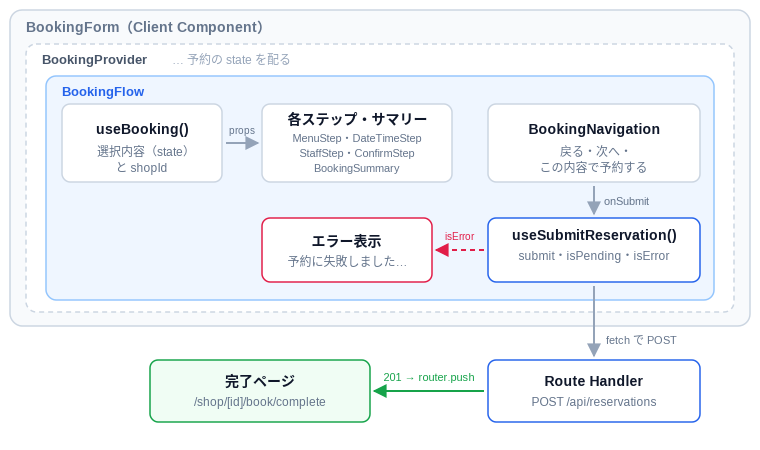
画面と API の流れ
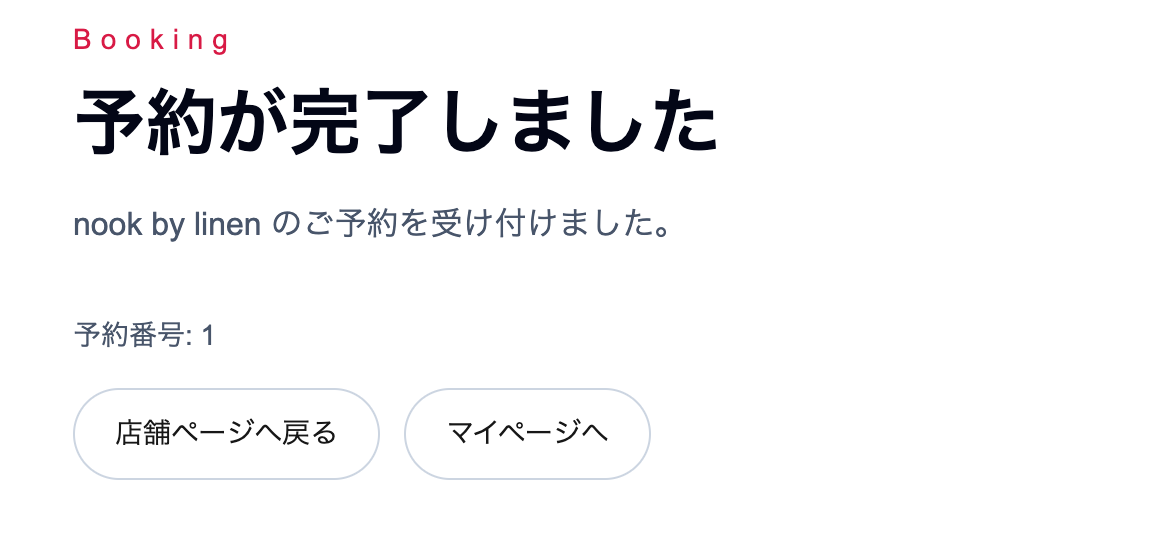
動作確認
npm run devがエラーなく起動することを確認します(zodのインストール漏れがあると、ここで失敗します)。/shop/1/bookで STEP 4 まで進み、「この内容で予約する」を押します。送信中は「予約中...」と表示され、/shop/1/book/complete?reservationId=1に遷移し、「予約が完了しました」と予約番号が表示されることを確認します。- 完了ページの「店舗ページへ戻る」で店舗ページに戻れること、
/shop/1/bookを開き直すと STEP 1 の未選択の状態から始まることを確認します。 - ブラウザの開発者ツールの「ネットワーク」タブで
reservationsへのリクエストを開き、ステータスが201であること、レスポンスに予約データが入っていることを確認します。
失敗時の確認
hooks/useSubmitReservation.ts の fetch の URL を、一時的に存在しないパスに変えます。
const res = await fetch("/api/reservation", {
STEP 4 で「この内容で予約する」を押すと、API が 404 を返すため res.ok が false になり、完了ページには移動せず、「予約に失敗しました。時間をおいてもう一度お試しください。」と表示されることを確認します。確認が終わったら、/api/reservations に戻します。
まとめ
| 項目 | 内容 |
|---|---|
| Zod | 実行時にデータの形をチェックする。ブラウザから届く値はサーバー側で必ずチェックする |
| z.infer | Zod スキーマから TypeScript の型を自動生成する |
| unknown | 中身がわからない値は any ではなく unknown にし、チェックしてから使う |
| ステータスコード | 201(作成成功)・422(内容が不正)を使い分ける |
| fetch | method: "POST" と JSON の body で Route Handler に送る。失敗は res.ok で判定する |
| useState | 送信中(isPending)と失敗(isError)を持ち、ボタンの無効化とエラー表示に使う |
| useSubmitReservation | 送信処理を hooks/ に切り出し、BookingForm は submit ・ isPending ・ isError を使うだけにする |
| BookingNavigation | ボタンの見た目と押せる条件をまとめ、onSubmit で押されたことだけを親に伝える |
| toReservationInput | if で未選択を確認してから変換し、! に頼らず型を安全にする |
| router.push | 成功したら完了ページへ遷移する。状態の後始末が要らず、URL も変わる |
| searchParams | Server Component では Promise で受け取り、await して URL のクエリを読む |
コース内レッスン
- 1
Lesson 1
はじめに
レッスンを見る - 2
Lesson 2
プロジェクト作成
レッスンを見る - 3
Lesson 3
コンポーネントとレイアウト
レッスンを見る - 4
Lesson 4
App Router
レッスンを見る - 5
Lesson 5
型定義とモックデータ
レッスンを見る - 6
Lesson 6
Route Handler
レッスンを見る - 7
Lesson 7
Dynamic Routes
レッスンを見る - 8
Lesson 8
店舗詳細ページ
レッスンを見る - 9
Lesson 9
Client Component と状態管理
レッスンを見る - 10
Lesson 10
予約フォーム
レッスンを見る - 11
Lesson 11
Firebaseセットアップ
レッスンを見る - 12
Lesson 12
ユーザ認証
レッスンを見る - 13
Lesson 13
Firebase認証
レッスンを見る - 14
Lesson 14
認証・認可
レッスンを見る - 15
Lesson 15
予約処理
レッスンを見る - 16
Lesson 16
ハイドレーション
レッスンを見る