
レイアウトの基本
Next.js 13のレイアウト
Next.js 13のレイアウトファイルはデフォルトで「app/layout.tsx」が用意されています。
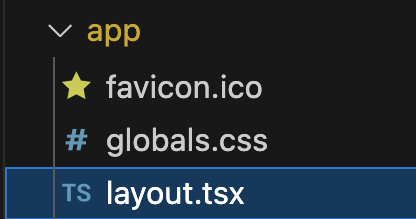
- Next.js 12のレイアウトは「components/layout.js」
レイアウトの構造
Next.js 13の共通レイアウトは、「Root Layout」と「children」で構成し、各コンテンツページは「page.tsx」を配置して表示します。
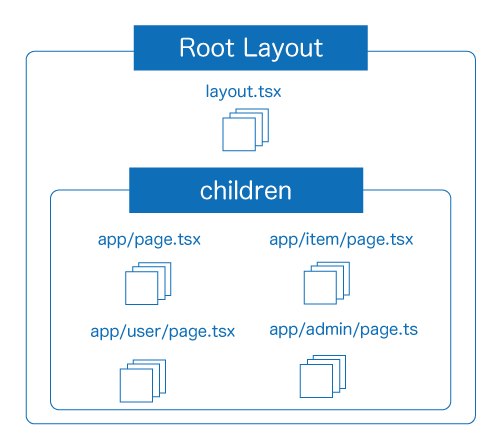
- Next.jsでは、ディレトリパスに対応したダイナミックルーティングで動作
RootLayout
RootLayoutはアプリ共通のレイアウトで、「app/layout.tsx」に配置します。
app/
├── layout.tsx
metadata
metadata は、HTMLのタイトルや説明などを設定する機能です。
app/layout.tsx
import type { Metadata } from 'next'

export const metadata: Metadata = {
  title: 'Next Tweet',
  description: 'This is tweet app sample.',
}
CSS
「global.css」をimportし、サイト全体のスタイルが反映されています。
import './globals.css'
レイアウトコンポーネント
レイアウト名は「RootLayout」で、ファンクションコンポーネントになっています。引数childrenは、React.ReactNode型を指定しています。
app/layout.tsx
export default function RootLayout({ children, }: { children: React.ReactNode}) {

}
children
レイアウト内で各ページコンポーネントを表示するには、childrenを利用します。ReactベースのためJSXでコーディングします。
app/layout.tsx
export default function RootLayout({ children, }: { children: React.ReactNode}) {
  return (
     <html lang="en">
       <body>{children}</body>
     </html>
  )
}
レイアウト分離
ページによってレイアウトを分離したいときは、フォルダごとに「layout.tsx」を作成します。
app/
├── layout.tsx
├── user/
│        ├── layout.tsx
│        └── page.tsx
└── admin/
         ├── layout.tsx
         └── page.tsx
レイアウト修正
共通レイアウトファイル「app/layout.tsx」を修正します。
metadata
不要な部分を削除し、metadataのタイトルと説明文を修正します。
app/layout.tsx
import type { Metadata } from 'next'
import './globals.css'

// metaデータ変更
export const metadata: Metadata = {
  title: 'Next Tweet',
  description: 'This is tweet app sample.',
}
JSX
レイアウトのHTML(JSX)を修正します。
app/layout.tsx
export default function RootLayout({
  children,
}: {
  children: React.ReactNode
}) {
  // JSX修正
  return (
    <html lang="ja">
      <body>
        <main className="flex min-h-screen flex-col p-2">
          {children}
        </main>
      </body>
    </html>
  )
}
- JSXでは「class」ではなく「className」で設定します
確認
ウィンドウタイトルが変更されたか確認してみましょう。
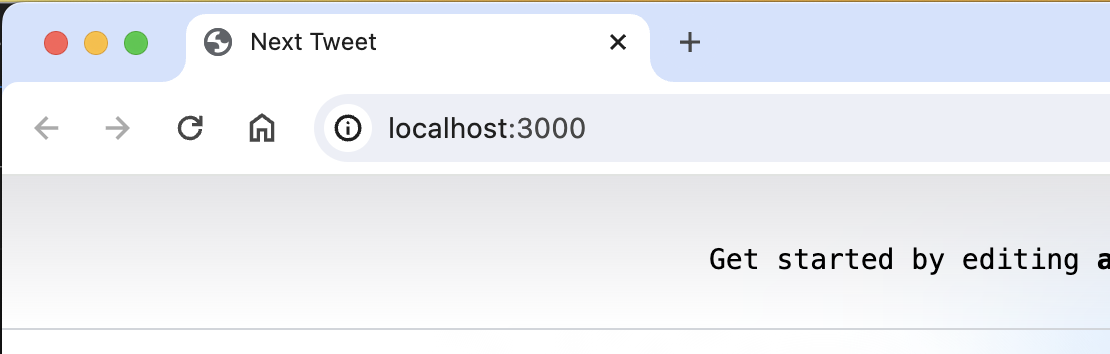
カスタムレイアウト
Next.jsでは「app/layout.tsx」はアプリ共通レイアウトですが、フォルダ階層ごとにレイアウトを作成して共有することもできます。
カスタムレイアウトの例
以下のファイル構成の場合、「auth/」にあるページはレイアウトファイル「app/auth/layout.tsx」が親ファイルとなります。 また「app/layout.tsx」が最上位のレイアウトファイルとなります。
client/
├── app/
│   ├── auth/
│   │         ├── layout.tsx
│   │         ├── login/
│   │         └── regist/
│   └── layout.tsx
カスタムレイアウトの作成
「app/auth/layout.tsx」を作成します。
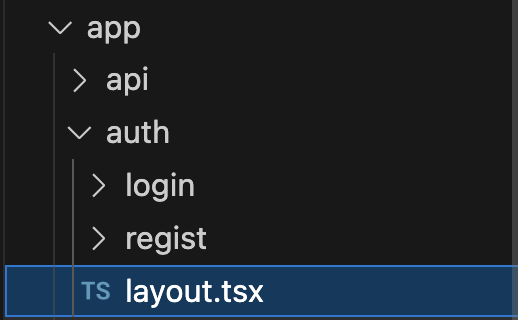
レイアウトファイルは「children」を引数として、子ページを表示します。
app/auth/layout.tsx
// childrenを引数とするコンポーネント
const AuthLayout = ({
    children
}: {
    children: React.ReactNode
}) => {
    // childrenに子ページを表示
    return (
        <div>
            {children}
        </div>
    );
}

export default AuthLayout;
コース内レッスン
- 1
Lesson 1
はじめるまえに
レッスンを見る - 2
Lesson 2
プロジェクト作成 - Laravel -
レッスンを見る - 3
Lesson 3
API処理 1
レッスンを見る - 4
Lesson 4
Postman
レッスンを見る - 5
Lesson 5
ユーザ認証API
レッスンを見る - 6
Lesson 6
API処理 2
レッスンを見る - 7
Lesson 7
プロジェクト作成 - Next.js -
レッスンを見る - 8
Lesson 8
レイアウト
レッスンを見る - 9
Lesson 9
コンポーネントの基本1
レッスンを見る - 10
Lesson 10
コンポーネントの基本2
レッスンを見る - 11
Lesson 11
コンポーネントの基本3
レッスンを見る - 12
Lesson 12
ルーティング
レッスンを見る - 13
Lesson 13
useState
レッスンを見る - 14
Lesson 14
モデルとサービス
レッスンを見る - 15
Lesson 15
useEffect
レッスンを見る - 16
Lesson 16
useRouter
レッスンを見る - 16
Lesson 16
プロパティ(props)
レッスンを見る - 17
Lesson 17
Cookie
レッスンを見る - 18
Lesson 18
useContext
レッスンを見る - 19
Lesson 19
NextAuth
レッスンを見る - 20
Lesson 20
NextAuthで認証
レッスンを見る