
IP-Adapter
IP-Adapterとは
IP-Adapter (Image Prompt Adapter) は、Stable Diffusion で画像の特徴をプロンプトとして活用できる拡張機能です。通常のテキストプロンプトに加えて、参照画像を元にスタイルやキャラクターの特徴を反映させた画像を生成できます。
プロンプトだけでは難しいスタイルに対応
IP-Adapterは、LoRAの技術を応用した軽量モデルで、事前に学習済みの画像エンコーダを用いて、入力画像の視覚的特徴を抽出し、それをStable Diffusionの生成プロセスに組み込むことで、プロンプトだけでは難しいスタイルの再現やキャラクターの統一を可能にします。
IP-Adapter のインストール
ターミナル
cd custom_nodes/
git clone https://github.com/cubiq/ComfyUI_IPAdapter_plus
代表的なIP-Adapterモデル
Huggingface: sdxl_models などからダウンロードできます。
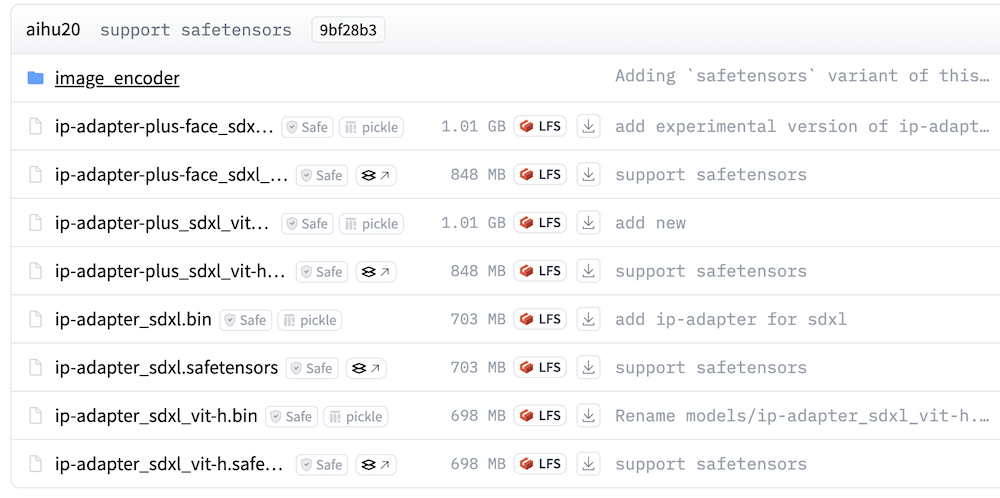
| モデル名 | 用途 | モデル |
|---|---|---|
| IP-Adapter SDXL | SDXL向けの汎用IP-Adapter | ip-adapter_sdxl.safetensors |
| IP-Adapter Plus | 詳細な特徴 | ip-adapter-faceid-plusv2_sdxl.safetensors |
| IP-Adapter Face ID | 顔の特徴を重視 | ip-adapter-faceid_sdxl.safetensors |
| IP-Adapter Face ID Plus | 顔の詳細な特徴を重視 | ip-adapter-faceid-plusv2_sdxl.safetensors |
設定
| 項目 | モデルファイル |
|---|---|
| Preprocessor | ip-adapter_face_id_plus |
| Model | ip-adapter-faceid-plusv2_sdxl.safetensors |
IP-Adapterのモデルをダウンロード
IP-Adapterにはいくつかの種類があります。Hugging Face などから .safetensors モデルをダウンロードし、ComfyUI/models/ipadapter/ フォルダに配置します。
ワークフロー例
ComfyUIのワークフローでノードを接続します。
[Load Checkpoint] --> [IP-Adapter] --> [KSampler] --> [VAE Decode] --> [Save Image]
                    ↑
            [Load Image]
                    ↑
         [IP-Adapter Model]
ワークフローの説明 Load Checkpoint: SDXLのチェックポイントモデルをロード。 Load Image: 参考画像をロードし、IP-Adapterに渡す。 IP-Adapter: 画像の特徴を抽出し、生成プロセスに適用。 Prompt Encoder: テキストプロンプトのエンコーディング。 KSampler: 画像生成のステップを制御。 VAE Decode: 画像をデコード。 Save Image: 出力を保存。
コース内レッスン
- 1
Lesson 1
はじめに
レッスンを見る - 2
Lesson 2
画像生成AIモデル
レッスンを見る - 3
Lesson 3
Stable Diffusion
レッスンを見る - 4
Lesson 4
FLUX
レッスンを見る - 9
Lesson 9
MoveNet
レッスンを見る - 11
Lesson 11
Face Detailer
レッスンを見る - 19
Lesson 19
ComfyUI
レッスンを見る - 20
Lesson 20
Beautiful Realistic Asians
レッスンを見る - 21
Lesson 21
ControlNet
レッスンを見る - 22
Lesson 22
OpenPose
レッスンを見る - 23
Lesson 23
Scribble
レッスンを見る - 24
Lesson 24
Face Detailer
レッスンを見る - 25
Lesson 25
IP-Adapter
レッスンを見る - 26
Lesson 26
Depth
レッスンを見る - 27
Lesson 27
CompyUIリアルレーポート
レッスンを見る - 30
Lesson 30
3Dモデル作成
レッスンを見る